Mass Notification Test
This is a test of the Coweta Public Schools mass notification system.
We are testing our communication systems to ensure we can reach families when it matters. You may receive this test through phone call, text message, email, and/or the CowetaPS App.
This is only a test. No action is required.
Thank you for helping us ensure our communication systems are working properly.
This is a test of the Coweta Public Schools mass notification system.
We are testing our communication systems to ensure we can reach families when it matters. You may receive this test through phone call, text message, email, and/or the CowetaPS App.
This is only a test. No action is required.
Thank you for helping us ensure our communication systems are working properly.

School Pictures Are Ready!
View and order at: https://shop.jostenspix.com/login
School Name: COWETA HIGH SCHOOL
Event Code: FE56826
Student Identifier: Also Needed: Student ID
CIHS Tiger News- https://canva.link/8gtftpzadwjsn3g
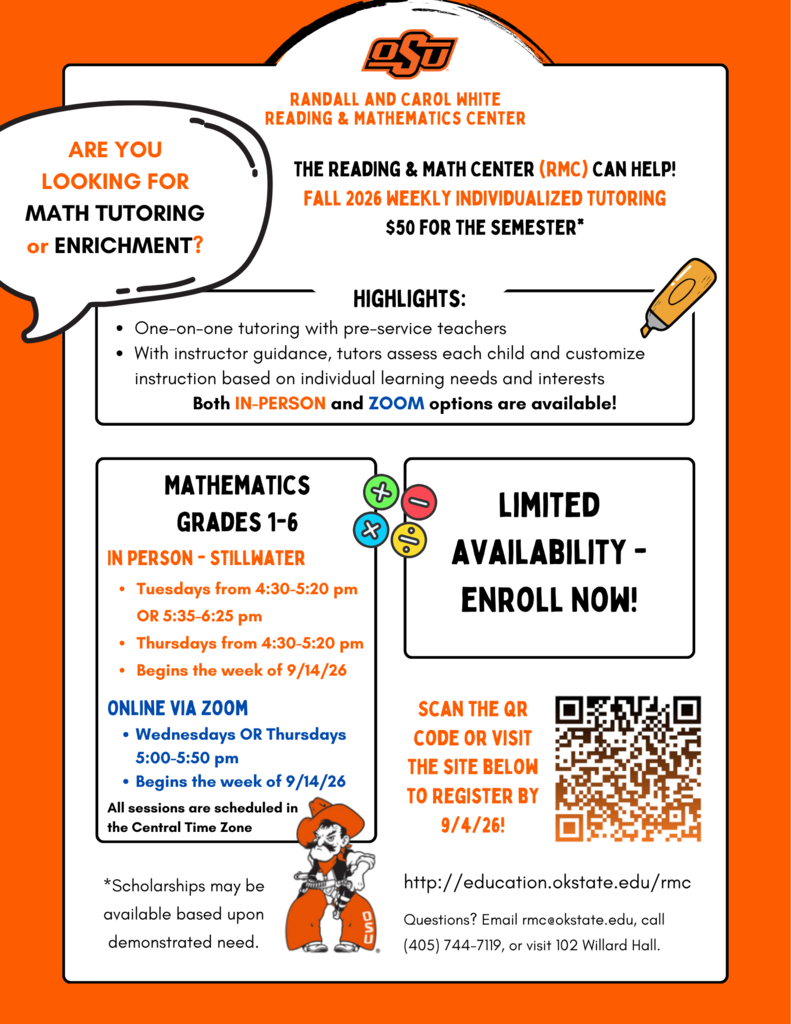
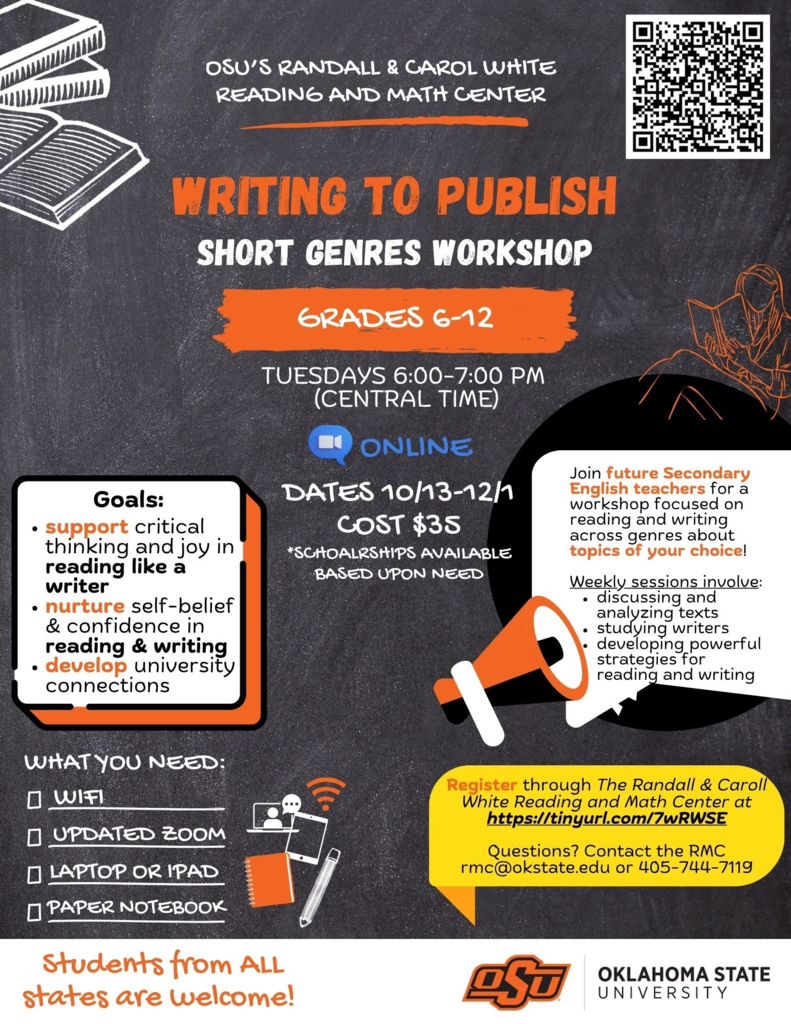
Reading, Writing and Math Tutoring
Both in-person and online opportunities for children in grades 1-12 are available this semester through the Randall and Carol White Reading and Mathematics Center at Oklahoma State University.
Registration link: https://secure.touchnet.com/C20271_ustores/web/store_cat.jsp?STOREID=45&CATID=574
Scholarships are available based upon demonstrated need. Families are encouraged to email rmc@okstate.edu for more information.
Both in-person and online opportunities for children in grades 1-12 are available this semester through the Randall and Carol White Reading and Mathematics Center at Oklahoma State University.
Registration link: https://secure.touchnet.com/C20271_ustores/web/store_cat.jsp?STOREID=45&CATID=574
Scholarships are available based upon demonstrated need. Families are encouraged to email rmc@okstate.edu for more information.
COWETA ATHLETICS
2026-27 Event Details
-Gate: Adult-$7 Student/Seniors (65 and over)-$5 Cash Only
Playoffs: $10 or Online $7 (Plus fee)
-We will accept OCA Passes/OSSAA Playoff Passes and will
offer Coweta Punch Cards (sold August-December-$85)
-Livestreaming: will be through HUDL.FAN.COM. $7 per game
(Except when using Visitor/Opponent HUDL)
*No backpacks or ice chests.
*No ball of any kind will be allowed inside sporting events.
*No electronic noisemakers, paint, powder, laser pointers of
any kind unless approved by administration.
*Coweta Athletics reserves the right to check any bag that
comes through our gates for safety purposes.
*Students in grades K-8 must be accompanied by an adult at
all events.
*No Reentry Policy is in affect and once gates close at the
event, there will be no entry.
Chromebook Grace Period Ends Monday — Protect Your Student’s Device
The two-week Chromebook grace period ends Monday.
Families have been given the first two weeks of school to identify and report any existing problems or damage with their student’s school-issued Chromebook. After Monday, students may be responsible for damage to their device that occurs during the school year.
Now is a great time to consider Chromebook insurance.
For a relatively small one-time cost, School Device Coverage can help protect families from a much larger unexpected expense. A Chromebook replacement can cost $218–$358, while coverage is available for $23 for the Chromebook alone or $28 for the Chromebook and charger.
Coverage includes accidental damage, cracked screens, liquid damage, loss and theft, with no deductible. Coverage runs through July 31, 2027.
Purchasing coverage is easy
Parents purchase coverage directly from School Device Coverage online. Please do not send money to your child’s school.
When completing the online form, you do not need to know your student’s Chromebook serial number. Simply enter TBD in the serial number field.
You can enroll online through School Device Coverage:
https://schooldevicecoverage.com/signup
One important reminder: Insurance is designed to cover future incidents. Existing damage or loss that is already present when coverage is purchased is not covered.
A little protection can prevent a big expense
Chromebooks go everywhere with our students, and accidents happen — backpacks get dropped, screens get cracked, and drinks get spilled. Device coverage gives families a simple and affordable way to protect themselves from potentially significant repair or replacement costs during the school year.
If you plan to purchase coverage, we encourage you to do so before an accident happens.
🍕 **Raise Some Dough for Coweta Project Graduation Academy!**
Make Monday, **August 24**, a Papa Johns day! Use promo code **DOUGH** when ordering from the participating Broken Arrow location and **20% of your order will be donated to Coweta Project Graduation Academy**.
📍 24192 E. Highway 51, Broken Arrow
📞 (918) 505-1040
🏷️ Promo Code: **DOUGH**
Grab some pizza and support our students at the same time! 🍕🎓
#CowetaDNA
Make Monday, **August 24**, a Papa Johns day! Use promo code **DOUGH** when ordering from the participating Broken Arrow location and **20% of your order will be donated to Coweta Project Graduation Academy**.
📍 24192 E. Highway 51, Broken Arrow
📞 (918) 505-1040
🏷️ Promo Code: **DOUGH**
Grab some pizza and support our students at the same time! 🍕🎓
#CowetaDNA


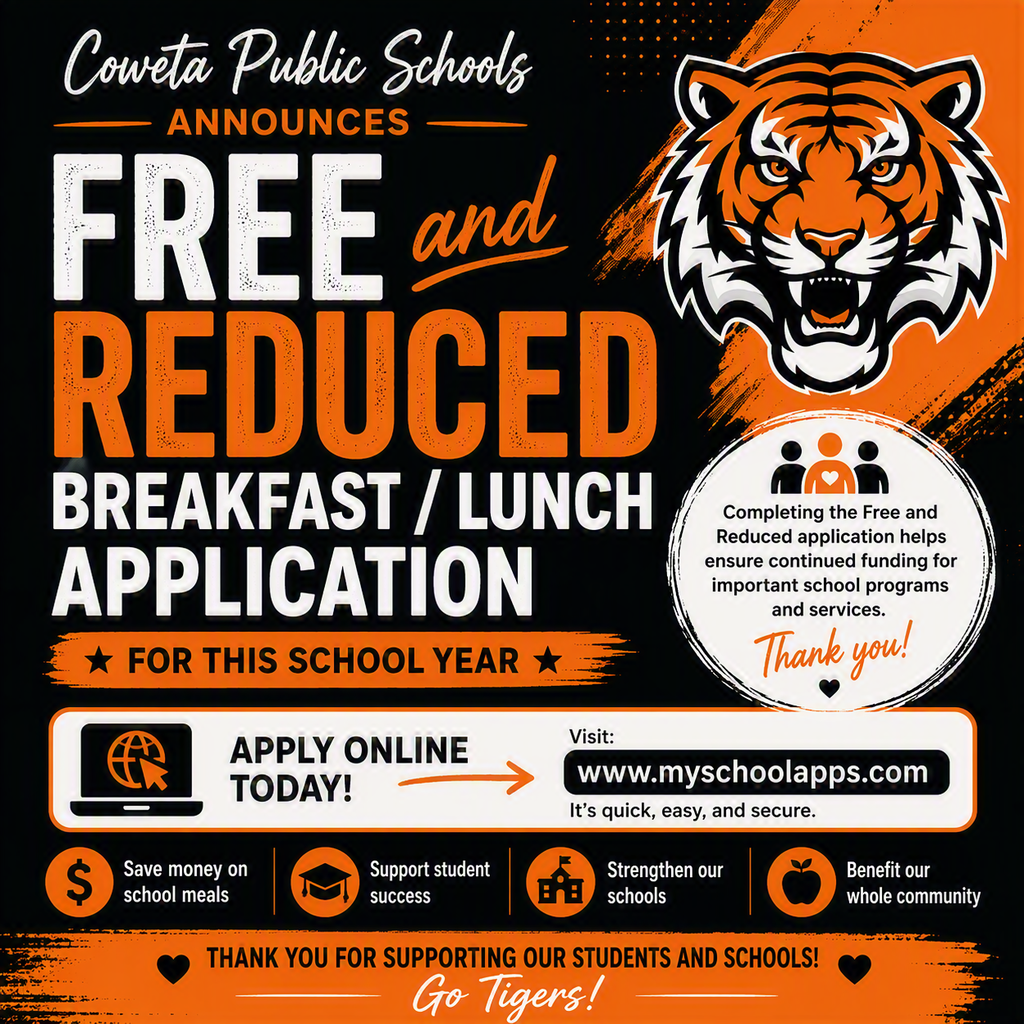
🍎🥛 It's Almost Lunchtime...Who's Hungry? 🥛🍎
With school starting this week, now is the perfect time to complete your Free & Reduced Breakfast/Lunch Application for the 2026-27 school year!
👉 Apply online today: https://www.myschoolapps.com/
Important Reminder: Families must complete a new application each school year, even if they qualified last year.
Completing the application may provide benefits such as:
✅ Free or reduced-price breakfast and lunch for eligible students
✅ Additional funding for technology and internet access programs
✅ Reduced fees for ACT, SAT, and AP exams, plus scholarship opportunities
✅ Discounts on college application fees
✅ Increased state aid funding that benefits Coweta Public Schools and our students
Even if you're unsure whether you qualify, we encourage all families to complete the application. Every application helps support opportunities and resources for our students and schools.
📞 Questions? Contact the Coweta Public Schools Child Nutrition Department at 918-486-0801
🔗 Learn more: https://www.cowetaps.org/page/child-nutrition
With school starting this week, now is the perfect time to complete your Free & Reduced Breakfast/Lunch Application for the 2026-27 school year!
👉 Apply online today: https://www.myschoolapps.com/
Important Reminder: Families must complete a new application each school year, even if they qualified last year.
Completing the application may provide benefits such as:
✅ Free or reduced-price breakfast and lunch for eligible students
✅ Additional funding for technology and internet access programs
✅ Reduced fees for ACT, SAT, and AP exams, plus scholarship opportunities
✅ Discounts on college application fees
✅ Increased state aid funding that benefits Coweta Public Schools and our students
Even if you're unsure whether you qualify, we encourage all families to complete the application. Every application helps support opportunities and resources for our students and schools.
📞 Questions? Contact the Coweta Public Schools Child Nutrition Department at 918-486-0801
🔗 Learn more: https://www.cowetaps.org/page/child-nutrition
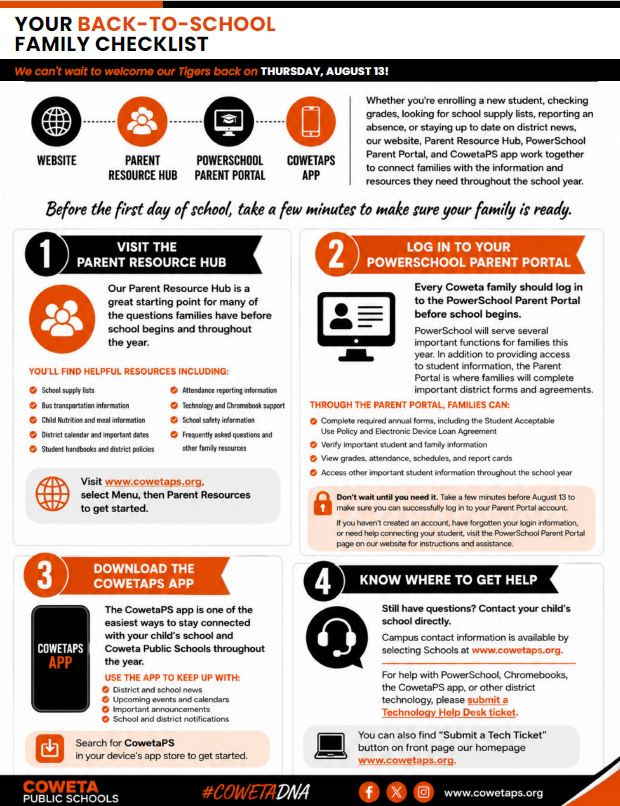
Your Back-to-School Family Checklist
As we prepare to welcome students back on Thursday, August 13, Coweta Public Schools has made it easier than ever for families to find important information and stay connected.
Whether you're enrolling a new student, checking grades, looking for school supply lists, reporting an absence, or staying up to date on district news, our website, Parent Resource Hub, PowerSchool Parent Portal, and CowetaPS app work together to connect families with the information and resources they need throughout the school year.
Before the first day of school, take a few minutes to make sure your family is ready.
✓ Visit the Parent Resource Hub
Our Parent Resource Hub is a great starting point for many of the questions families have before school begins and throughout the year.
You'll find helpful resources including:
School supply lists
Bus transportation information
Child Nutrition and meal information
District calendar and important dates
Student handbooks and district policies
Attendance reporting information
Technology and Chromebook support
School safety information
Frequently asked questions and other family resources
Visit www.cowetaps.org, select Menu, then Parent Resources to get started.
✓ Log in to Your PowerSchool Parent Portal
Every Coweta family should log in to the PowerSchool Parent Portal before school begins.
PowerSchool will serve several important functions for families this year. In addition to providing access to student information, the Parent Portal is where families will complete important district forms and agreements.
Through the Parent Portal, families can:
Complete required annual forms, including the Student Acceptable Use Policy and Electronic Device Loan Agreement
Verify important student and family information
View grades, attendance, schedules, and report cards
Access other important student information throughout the school year
Don't wait until you need it. Take a few minutes before August 13 to make sure you can successfully log in to your Parent Portal account.
If you haven't created an account, have forgotten your login information, or need help connecting your student, visit the PowerSchool Parent Portal page on our website for instructions and assistance.
✓ Download the CowetaPS app
The CowetaPS app is one of the easiest ways to stay connected with your child's school and Coweta Public Schools throughout the year.
Use the app to keep up with:
District and school news
Upcoming events and calendars
Important announcements
School and district notifications
Search for CowetaPS in your device's app store to get started.
✓ Know Where to Get Help
Still have questions? Contact your child's school directly. Campus contact information is available by selecting Schools at www.cowetaps.org.
For help with PowerSchool, Chromebooks, the CowetaPS app, or other district technology, please submit a Technology Help Desk ticket.
You can always find the Technology Help Desk using the quick link on the www.cowetaps.org homepage.
We look forward to welcoming our Tigers back on August 13!
Parents, it's crunch time! A few important reminders as we get ready for the start of school:
Chromebook fees can now be paid online through PowerSchool:
https://powerschool.cowetaps.com/public/
Schedule pickup is next Tuesday from 4:30 PM to 7:00 PM.
For additional back-to-school information, please visit:
https://docs.google.com/document/d/1qDF5iow41i7S6RtiBtxKTexpqVfu945iyF7PiEUfuZs/edit?usp=sharing
We look forward to seeing everyone soon!
Chromebook fees can now be paid online through PowerSchool:
https://powerschool.cowetaps.com/public/
Schedule pickup is next Tuesday from 4:30 PM to 7:00 PM.
For additional back-to-school information, please visit:
https://docs.google.com/document/d/1qDF5iow41i7S6RtiBtxKTexpqVfu945iyF7PiEUfuZs/edit?usp=sharing
We look forward to seeing everyone soon!
Dear Parents/Guardians,
We are pleased to announce that you can now pay your student's Chromebook fee online through the PowerSchool Parent Portal if you prefer this payment option.
To make a payment, you must log in through the PowerSchool website at:
https://powerschool.cowetaps.com/public/
Please note that the payment page is not accessible through the PowerSchool app. You must use the website.
Once logged in:
-Click Purchases & Payments on the left side of the page.
-You will be directed to the payment screen.
-Follow the prompts to complete your payment.
Please be aware that a small convenience fee will be charged for online payments.
If you have any questions, please contact your student's school office.
Thank you,
Coy Graves
CIHS Principal
CIHS doesn’t have a PTO since students are only here for one year. However, we still rely on parents/guardians to help out our staff and students throughout the year. I am looking for a few parents that would be willing to serve as facilitators that would be able to plan different activities for our school. Please email me if you are interested in serving in this capacity.
The August District Newsletter is Here!
Our August newsletter includes important back-to-school information for students, families, and staff, including:
📅 Important August dates and first day reminders
✅ Your Back-to-School Family Checklist
💻 Parent Resource Hub, PowerSchool Parent Portal, and Coweta PS App information
🍎 Child Nutrition and Free & Reduced Meal applications
🛡️ Community Safety Night and school safety updates
💉 Immunization requirements and deadlines
🏗️ Bond construction progress
🐅 Fall athletics schedules
Take a few minutes to review the newsletter so you're ready for a great start to the 2026–2027 school year. We can't wait to welcome everyone back!
📖 Read the full newsletter below.
https://aptg.co/fDHhX9
2026-2027 Coweta Public School Bus Registration
This year, our transportation department will be transitioning to digital bus registration. You will use this form to register your child for bus transportation, and will receive an Apptegy notification when your registration has been processed. Attached is a link to the Bus Rider Handbook. Please go over this with your students and discuss appropriate bus behavior. You can reach our transportation department directly at 918-486-5005 if further assistance is needed.
https://www.cowetaps.org/forms/29279
This year, our transportation department will be transitioning to digital bus registration. You will use this form to register your child for bus transportation, and will receive an Apptegy notification when your registration has been processed. Attached is a link to the Bus Rider Handbook. Please go over this with your students and discuss appropriate bus behavior. You can reach our transportation department directly at 918-486-5005 if further assistance is needed.
https://www.cowetaps.org/forms/29279
CIHS 26-27 B2S Parent Info- https://docs.google.com/document/d/1qDF5iow41i7S6RtiBtxKTexpqVfu945iyF7PiEUfuZs/edit?usp=sharing
Aviation Maintenance Program
We will be offering a new technology pathway within the STEM career cluster that focuses on aerospace maintenance.
The first course will be Regulations and Ground Operations. The course covers safety, ground operations and servicing, hand tools and measuring devices, weight and balance, mathematics, and physics for aviation.
In future years, we plan to add Applied Sciences of Aircraft Maintenance, Basic Electricity, and Aircraft Materials and Corrosion Control.
Please fill out this google form if you are interested in changing your career pathway and enrolling in this new course.
https://docs.google.com/forms/d/e/1FAIpQLSexHb_heVYQ2VR0v3_X7lf6YbS4OonsoEg44tbjD17XpZa20Q/viewform
We will be offering a new technology pathway within the STEM career cluster that focuses on aerospace maintenance.
The first course will be Regulations and Ground Operations. The course covers safety, ground operations and servicing, hand tools and measuring devices, weight and balance, mathematics, and physics for aviation.
In future years, we plan to add Applied Sciences of Aircraft Maintenance, Basic Electricity, and Aircraft Materials and Corrosion Control.
Please fill out this google form if you are interested in changing your career pathway and enrolling in this new course.
https://docs.google.com/forms/d/e/1FAIpQLSexHb_heVYQ2VR0v3_X7lf6YbS4OonsoEg44tbjD17XpZa20Q/viewform
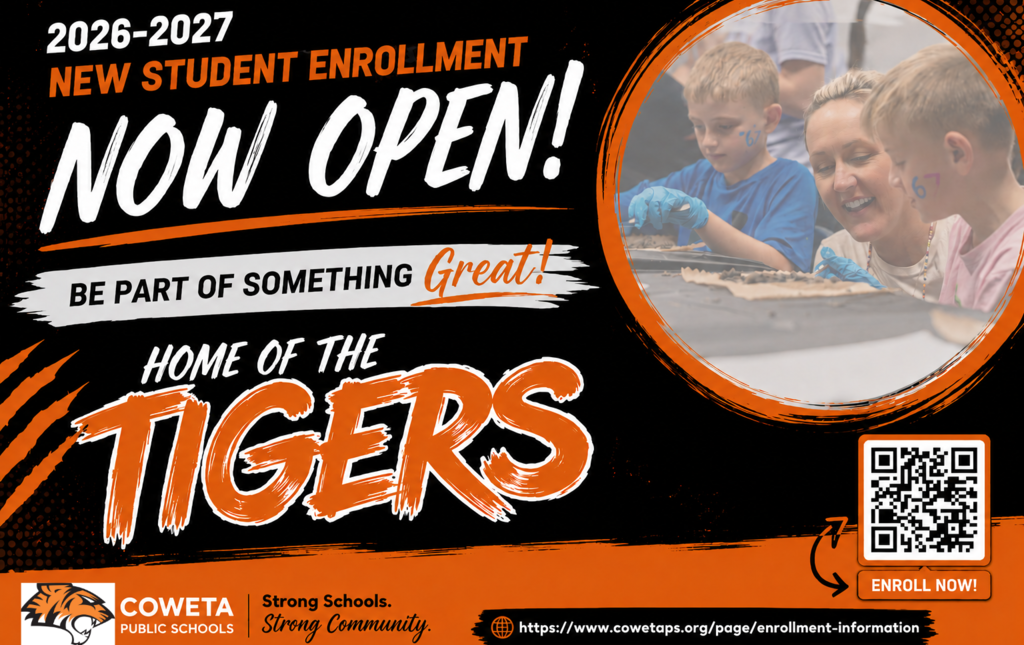
2026-2027 New Student Enrollment Now Open!
Coweta Public Schools is excited to announce that new student enrollment for the 2026-2027 school year is now available online!
If your child has never attended Coweta Public Schools, you can begin the enrollment process by scanning the QR code on this graphic or visiting:
https://www.cowetaps.org/page/enrollment-information
How the New Student Enrollment Process Works
Complete and submit the online New Student Pre-Registration Form.
A separate form must be submitted for each student you wish to enroll.
Once submitted, a campus registrar will review and approve the pre-registration information.
After approval, the parent/guardian will receive an email with instructions for creating a PowerSchool Parent Portal account.
Through the Parent Portal, you will complete and submit the remaining required enrollment forms and documentation.
Important Reminder
Submitting the online pre-registration form does not complete enrollment. A student is not officially enrolled until:
All required forms have been completed,
All required documentation has been submitted,
And the enrollment has been reviewed and approved by district staff.
Summer Registration Office Schedule
Please note that school registration offices are typically closed from mid-June through the end of July. During this time, processing and approvals may take longer than normal.
We look forward to welcoming new students and families to Coweta Public Schools—Home of the Tigers!
Strong Schools. Strong Community. #cowetaDNA